
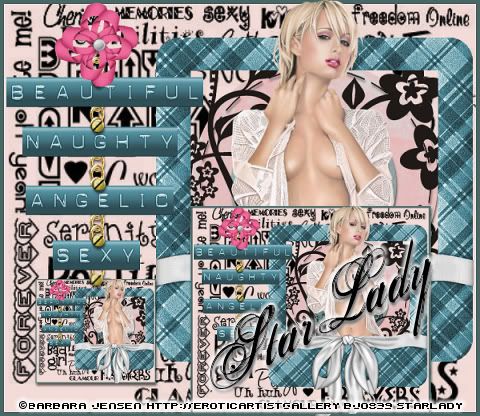
Click on tag to see full size
This tutorial is written for those with working knowledge of PSP.
I used PSP 9 for this tutorial, but it could be done with other versions I'm sure.
I used the wonderful artwork of Barbara Jensen. Please do not use her artwork without a license from HER SITE .
Optional- Eye Candy 4000 Gradient Glow
Font of choice
~Supplies you will need~ Zip HERE
In zip file:
Clarey’s Dymolabels
Clarey’s Funky Scrapkit
Clarey’s Rubylicious Scrapkit
Please visit Clarey HERE. Thank you Clarey!!
Chain and flatpin (can’t seen to find the screw I used)
Mask
If any of the supplies are yours please let me know so I can give you proper credit.
~Okay Let’s get started~
Don’t forget to rename layers as you go
Open and minimize mask in PSP
Open a 600 x 600 transparent image (we will resize later)
Flood Fill with a color that compliments your tube
New Raster layer, Flood Fill with black
Apply Mask -Layers > New Mask Layer > From Image
Layer Palette > Delete Mask layer > Merge > Merge Group
Open a Frame in Rubylicious Scrapkit. I used Frame 3.
I used the freehand tool> point to point to select the frame (except the bow)
Adjust> Hue & Saturation> Colorize
Copy and Paste Tube as new layer (resize if needed)
To make the tube stick out: Use the freehand> point to point to select all of the tube that would cover up the bow on the frame. Hit Delete on your keyboard
Merge the frame and Tube
Copy and paste 4 of Clarey’s labels (resize if needed)
Adjust > Adjust> Hue & Saturation> Colorize (use the same color you did before)
X out all the labels for now
Copy and paste chain, Image > Rotate > Free Rotate 90
Adjust> Hue & Saturation> Colorize (gold color)
Un-X labels position on the chain as on my tag
Copy and Paste Bow from Funky Scrapkit, position as on my tag
Copy and paste flatpin – Adjust> Hue & Saturation> Colorize (gold color)
Layers > Duplicate for a total of 4 flatpins, position as on my tag
X out the last duplicated flatpin
New Raster – move just above the Mask Layer
To make the frame around the whole tag: Selections > Select All > Selections > Modify >Contract by 2 > Selections > Invert
Flood Fill with a color in-between the ants
Window > Duplicate
Image > Resize > resize about 60 – Resize All Layers checked
Copy, paste and position in front of the large tube and frame on the original tag
Go back to the duplicated tag Edit > Undo Resize
Image > Resize about 40 –Resize All Layers checked
Copy and paste resized tag onto original tag, position on the bottom of the chain
Un-X the 4th flatpin and position as on my tag
Image > Resize > Resize all about 80% to be in accordance with Barbara Jensen’s TOU > Image > Image Information-to see the size of the tag.
Add Copyright Credits, Save As a blank JPEG
Go back add your name > Eye Candy 4000 Gradient Glow –change “Glow Width” to 5, Color -White
and Save As again.
DONE I hope you enjoyed this tut
If you have any problems please feel free to e-mail me at: starladystudio@bellsouth.net
HUGS StarLady


No comments:
Post a Comment